Environmental Life Science students selected a narrow topic to create a thesis statement, research their topic and make a poster. They could choose to use interactive methods, like Glogster: Education version, word processing or presentation software or web applications and static posters.
Most selected an interactive format. I will be displaying these over the next few days. What do you think of this interactive web application? Do you see an opportunity to use it and replace the static poster?
Showing posts with label students. Show all posts
Showing posts with label students. Show all posts
Friday, November 20, 2009

Sunday, May 25, 2008
CR2.0: Just in Time Science Resources
While reading the new discussion items at Classroom2.0, I came across a request from a student, Mike P, in the Web 2.0 Class. Mike's request was to find
Cellular Biology recommendations were first made by Michelle Eckstein, Shaun Fletcher and Britt Gow. Here is my response to the excellent request:
...good sites where [I] can find videos or even a good podcast for cellular biology?
Cellular Biology recommendations were first made by Michelle Eckstein, Shaun Fletcher and Britt Gow. Here is my response to the excellent request:
Good recommendations from all. I have used the Cells Alive website which is excellent, as are the others.
I would like to recommend a science education portal BioInteractive. Their motto is, "Teach Ahead of the Textbook", and BioInteractive is part of a worldwide effort by research scientists to help more people learn about science. Their focus at BioInteractive is providing material and information for science educators and their students.
Research labs and universities provide excellent virtual labs, still images, "Holdiay Lectures" on a science topic, videos, podcasts and so much more. I have used various BioInteractive materials with 6th - 12th grade students. Many of the materials could be used with younger students.
You can sign up for the HHMI Bulletin. The May Issue
would be very helpful to teachers. Also, you can receive their newsletter and get science research and news updates that can be used as current events for science or professional development information.

Thursday, February 28, 2008
Interactive Science Experiences: Solar Weather 2008

Now is the time! This is the moment! You the teacher have waited since all these new online applications made email one dimensional, and NOW you can use them easily in a protected environment.
You can learn to use these new tools of technology in your classroom and in your life. I believe that using these Web2.0 tools can improve your productivity, as well as student achievement.
With a bit of effort, you can break into the Web2.0 world, and NASA has the tools to help. There are an enormous number of projects, activities and materials available to teachers, for science, math and technology, yet also for social studies, languages and other areas of education.
All you have to do is find the topic you are studying, and NASA can point you to the websites and online interactive practices to grab and hold students' attention. Then the rest is up to you, do one activity, one project or an array of related interactions and lessons. Don't forget to make an official connection with the NASA group, so you can always email or talk with someone who can help or answer questions.
If you talk with any science teacher, connecting with NASA, they will tell you their favorite NASA area. You could spend an entire teaching career using a variety of NASA connections and never know that other stuff is out there. For myself, one of my favorite NASA groups is the SECEF, Sun-Earth Connection Education Forum.
Each year, the ingenious educators, technicians and scientists, at the Sun-Earth Connection Education Forum, provide Science Math & Technology teachers with new, more creative, yet mind enhancing multimedia, projects and opportunities for students, teachers, scientists and the public to develop their knowledge of Sol and Earth.
Many of these new opportunities are considered interactive, part of the new Web2.0 movement.
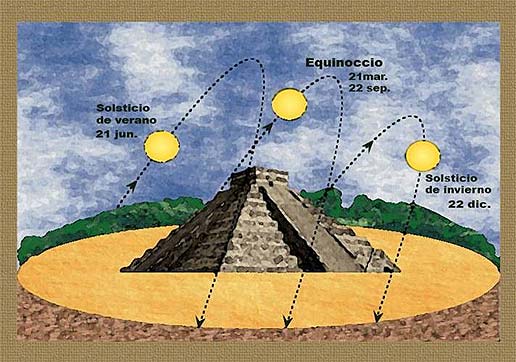 One of the most exciting, yet practical Sun-Earth celebrations of the SECEF, Ancient Observatories, continued the NASA educational traditions while paving the trail into the online, interactive path for science education.
 With podcasts, email alerts, related summer institutes, online projects, partnerships and public activities, the SECEF team really pulled the Sun-Earth Day problem based learning project into an international learning celebration. Each year since, they have continued this powerful methodology of linking students, teachers, scientists and the public around the world into a model classroom.
If you ready to begin an educational partnership with the SECEF, the Sun-Earth Connection Education Forum, start by registering at the Sun-Earth Day 2008 websited or by emailing Elaine Lewis, lewis@mail630.gsfc.nasa.gov and to receive the 2008 Sun-Earth Day Packet and email updates.
 One Web 2.0 Sun-Earth Connection Education Forum (SECEF) activities you missed, but can use asynchronously, is the Arctic Circle Sunrise 2008. This series of meetings and interviews was part of the Polar Gateway Conference that ran during the last week in January. There are excellent interviews and historical perspectives from some of the scientists and assistants from the local Inuit communities. Their stories are marvelous, and I think children and young people would agree. Other information and images are also available from this conference.
Saturday, November 3, 2007
ClipMarks and a Firefox Update
This morning I received a notice that there were new updates for my excellent browser, Firefox, so I updated. As usual, the ending screen asked if I wanted to see the recommended Firefox add-ons. Certainly!! I always do.
As I was browsing through the add-ons, I noted a few that I might want to add, and then I came to Clipmarks. Oooooh!! ClipMarks has become my favorite social bookmarking community, so I thought "I haven't reviewed this add-on yet. I resolved that omission. I rated and reviewed Clipmarks for the Firefox review of Clipmarks that is available in the add-on download section.
Here is my review:
Clipmarks adds value to your browsing, browsing, clipping and sharing experience. Being a bookmark and hotlist aficionado, I was curious about ClipMarks. I already had del.icio.us, but I was drawn to the added feature of clipping quotable material.
I first added Clipmarks in early June, 2007 because it sounded like a great free tool for research. On the fly, I could copy snippets of the article I found important,as well as, properly quote and cite information for later use.
Being a teacher, I immediately could see the potential value for students researching a topic on the internet. When they found an article, they could clip it, store it online, and use it later for their research. I thought it would be especially helpful for teachers who ask students to find Current Event articles in their study area.
What I didn't know was that Clipmarks is a very powerful add-on program. You can clip snippets, pictures and save them to your online file. Also, you can tag your article in del.icio.us or magnolia. Your comments, are yours, they belong to you, so you can use them later in your research. Another striking feature is the ability to send your clipmark to your blog(there are several) or get code to embed in blogs, like MySpace, that are not supported. There are a vast array of other extras available in Clipmarks that you will want to use.
All your Clipmarks can be private, but by making your clips public, you have the added benefit of community. There is a community of "clippers" who can pop your clipmarks. The pop is a way to acknowledge your clip as interesting or important. They add your clip to their database...with credit to you. Also, people can comment on a public clip. Many times, clippers have led me to other similar articles.
Clipmarks is a wonderful online tool, with a tiny icon(w/dropdown menu) and a great community that is more agile and responsive than Digg!
You can lock in redundant bookmarking to del.icio.us, so I think everyone should add-on ClipMarks....
Did I mention that I love Clipmarks, and I am reviewing it after using it for several months? Yeah! It's true.
As I was browsing through the add-ons, I noted a few that I might want to add, and then I came to Clipmarks. Oooooh!! ClipMarks has become my favorite social bookmarking community, so I thought "I haven't reviewed this add-on yet. I resolved that omission. I rated and reviewed Clipmarks for the Firefox review of Clipmarks that is available in the add-on download section.
Here is my review:
Clipmarks adds value to your browsing, browsing, clipping and sharing experience. Being a bookmark and hotlist aficionado, I was curious about ClipMarks. I already had del.icio.us, but I was drawn to the added feature of clipping quotable material.
I first added Clipmarks in early June, 2007 because it sounded like a great free tool for research. On the fly, I could copy snippets of the article I found important,as well as, properly quote and cite information for later use.
Being a teacher, I immediately could see the potential value for students researching a topic on the internet. When they found an article, they could clip it, store it online, and use it later for their research. I thought it would be especially helpful for teachers who ask students to find Current Event articles in their study area.
What I didn't know was that Clipmarks is a very powerful add-on program. You can clip snippets, pictures and save them to your online file. Also, you can tag your article in del.icio.us or magnolia. Your comments, are yours, they belong to you, so you can use them later in your research. Another striking feature is the ability to send your clipmark to your blog(there are several) or get code to embed in blogs, like MySpace, that are not supported. There are a vast array of other extras available in Clipmarks that you will want to use.
All your Clipmarks can be private, but by making your clips public, you have the added benefit of community. There is a community of "clippers" who can pop your clipmarks. The pop is a way to acknowledge your clip as interesting or important. They add your clip to their database...with credit to you. Also, people can comment on a public clip. Many times, clippers have led me to other similar articles.
Clipmarks is a wonderful online tool, with a tiny icon(w/dropdown menu) and a great community that is more agile and responsive than Digg!
You can lock in redundant bookmarking to del.icio.us, so I think everyone should add-on ClipMarks....
Did I mention that I love Clipmarks, and I am reviewing it after using it for several months? Yeah! It's true.
Subscribe to:
Posts (Atom)

 Posts
Posts





 Blinklist.com